Instantly Account Organiser
Turns a flat list of sending accounts into a grouped, bulk-actionable table with campaign attribution and health alerts.
What was going wrong
Instantly's email accounts page is a flat list. At 20+ accounts across several domains there is no grouping, no bulk editing beyond a status filter, and no way to see which campaign an account belongs to.
Health score is a single point-in-time number, so a drop from 100 to 82 goes unnoticed unless you happened to look yesterday. Pausing every account on one domain means 20+ individual clicks.
What I built
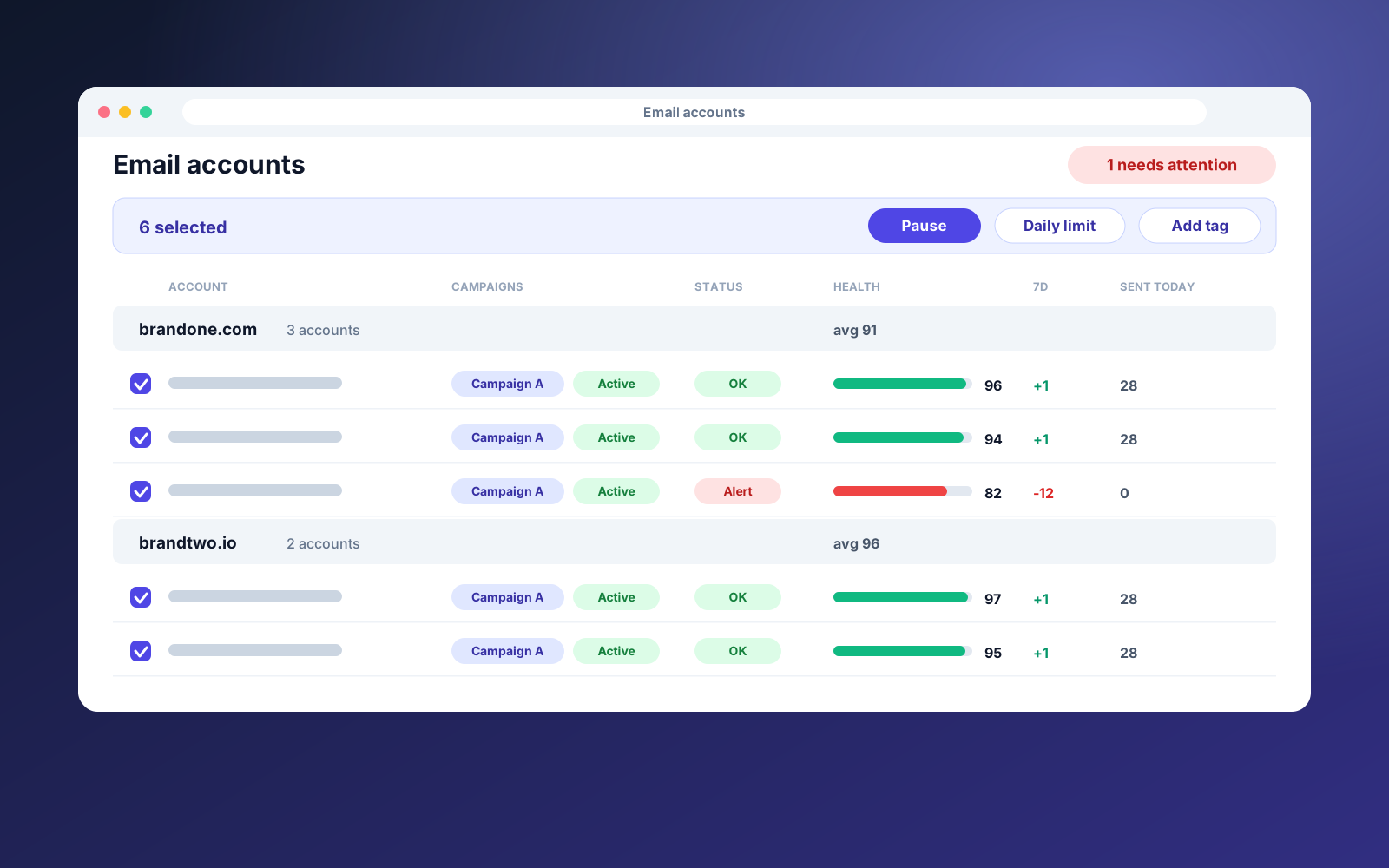
We built an overlay for the Instantly accounts page. Accounts are auto-grouped by domain with zero setup, and can be grouped by tag, status or provider as well. Each group shows rollups: account count, daily capacity, sent today and average health.
Multi-select bulk actions cover pause, resume, warmup, daily limit, sending gap and tags, each with a before and after confirmation and a progress drawer. Health snapshots are stored daily, so drops, errors and accounts that have gone silent are flagged with a badge and a Needs attention view.
Groups are saved as native Instantly tags, so they keep working outside the extension. It uses Instantly's official API with a scoped key, not page scraping.
Step by step
- 01
Connect with a scoped API key
Paste a key limited to just the permissions the tool needs.
- 02
See accounts grouped
Domains become groups instantly, with rollups per group.
- 03
Filter and select
Find the accounts you care about and select them in bulk.
- 04
Act in a few clicks
Pause, resume or change limits across a whole group, with a confirmation first.
- 05
Get alerted on drift
Health drops, errors and idle accounts surface automatically.
What it does
- Auto-grouping by domain, plus tags, status and provider
- Group rollups for capacity, sent today and average health
- Bulk pause, resume, warmup, limits, gaps and tags
- Before and after confirmation with a progress drawer
- 30 days of health history with drop alerts
- Campaign attribution to spot idle and silent accounts
- Saved views such as Needs attention
Built with
Other case studies
LinkedIn Connection Request Cleaner
Bulk withdraw pending sent invitations older than a set number of days, something LinkedIn has no native way to do.
Profile View Tracker Notes
Add a private note or tag to anyone who views your LinkedIn profile, turning a passive signal into a CRM action.
ScrollStop Lite: LinkedIn Feed Filter
A free suite of focused LinkedIn extensions, starting with a feed filter that hides the posts you do not want to see.
Gmail InboxHero
Finds the newsletters you no longer read, scores each sender, and gives you a one-click way to unsubscribe, all inside your browser.
Want something like this for your agency?
Book a free Ops Audit and I will show you which manual processes are worth automating first.